I’ve got an older MacBook Pro — Intel, 2017 — that had been sitting around gathering dust. Instead of letting it rot in a drawer, I decided to throw Omarchy on it. It worked, but there were a few driver quirks along the way, which is more or less what you sign up for when you put Linux on a decade-old Apple laptop.
I’m happy to have a second machine now, but I can’t stand the keyboard — honestly, I can’t stand any of the newer MacBook keyboards — so I picked up an HP 460 Bluetooth keyboard on sale at Micro Center. First attempt to pair it, no dice. Here’s the full story of everything I ran into getting this machine into daily-driver shape, and the fixes, in case anyone else is reviving similar hardware.
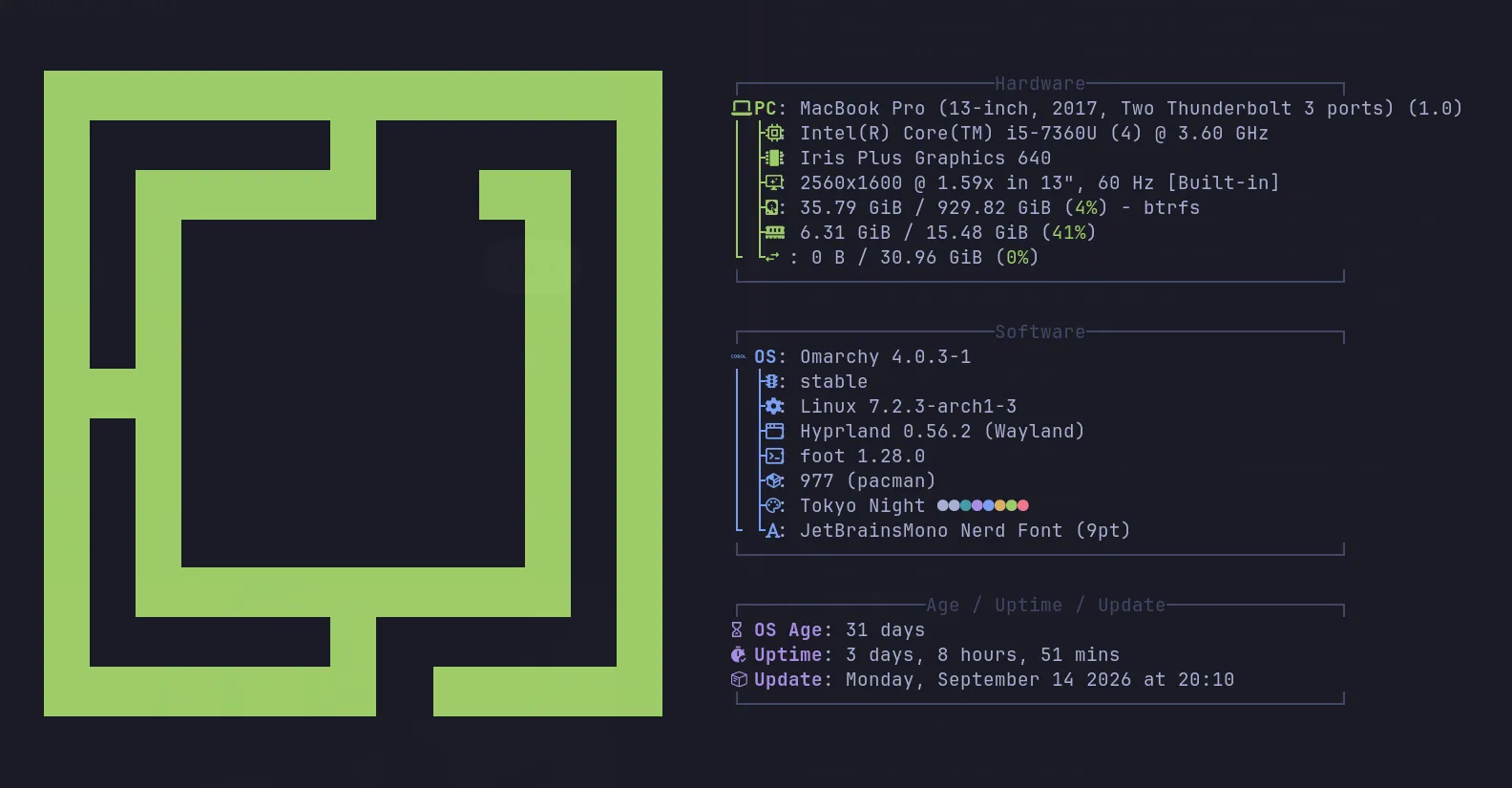
The machine
- Model: MacBook Pro (13-inch, 2017, Two Thunderbolt 3 ports) — MacBookPro14,1
- CPU: Intel Core i5-7360U (4) @ 3.60 GHz / Iris Plus Graphics 640
- Display: 2560x1600 @ 1.59x in 13“, 60 Hz (built-in)
- Storage: 35.79 GiB / 929.82 GiB used (4%) — btrfs
- Memory: 6.31 GiB / 15.48 GiB (41%)
- OS: Omarchy 4.0.3-1 (stable), Linux 7.2.3-arch1-3
- WM: Hyprland 0.56.2 (Wayland), foot 1.28.0
- Packages: 977 (pacman), Tokyo Night theme, JetBrainsMono Nerd Font (9pt)
- OS age: 31 days · Uptime: 3 days, 8 hours, 51 mins
Pre-T2 hardware like this is a decent Linux target precisely because it’s pre-T2 — no Apple silicon security chip fighting you for control of the boot process. But it does mean three separate pieces of Apple-specific hardware (Wi-Fi, audio codec, and — once you add a third-party keyboard — Bluetooth pairing) all needed their own workaround. I wrote each one up and pushed a standalone repo for it, since none of these are MacBook-specific problems once you get past the “why is this happening” part.
1. Wi-Fi randomly dying (brcmfmac)
Repo: marcmanley/brcmfmac-wifi-reset-fix
The built-in Broadcom Wi-Fi card uses the brcmfmac driver, which is notorious on older Apple hardware for silently wedging itself: it stays “associated” to the access point but stops passing traffic, or NetworkManager gets stuck in a state where a plain nmcli reconnect does nothing.
The fix here isn’t clever — it’s a blunt, known-good reset sequence:
- Log the current driver + NetworkManager state, so you have a before/after.
- Take the interface down.
- Unload and reload the kernel module:
modprobe -r brcmfmac/modprobe brcmfmac. - Restart
wpa_supplicant, thenNetworkManager. - Explicitly bring the named connection profile back up if it didn’t reconnect on its own.
- Report the final state and IP so you get a clear pass/fail.
#!/usr/bin/env bash
set -uo pipefail

IFACE="wlp2s0"
PCI="02:00.0"
PROFILE="New Andalus"
DRIVER="brcmfmac"

log() { echo "[wifi-fix] $*"; }

driver_now() {
  lspci -v -s "$PCI" 2>/dev/null | grep -oP 'Kernel driver in use: \K\S+'
}

nm_state() {
  nmcli -t -f DEVICE,STATE device status 2>/dev/null |
    awk -F: -v d="$IFACE" '$1==d{print $2}'
}

log "Current driver: $(driver_now 2>/dev/null || echo none)"
log "NM state: $(nm_state)"

log "Resetting Wi-Fi driver"
sudo ip link set "$IFACE" down 2>/dev/null || true
sudo modprobe -r "$DRIVER"
sleep 2
sudo modprobe "$DRIVER"
sleep 3

log "Restarting Wi-Fi services"
sudo systemctl restart wpa_supplicant
sleep 2
sudo systemctl restart NetworkManager
sleep 5

if [[ "$(nm_state)" != "connected" ]]; then
  log "Connecting to \"$PROFILE\""
  nmcli connection up "$PROFILE"
  sleep 4
fi

STATE="$(nm_state)"
IP="$(nmcli -t -f IP4.ADDRESS device show "$IFACE" 2>/dev/null | head -1 | cut -d: -f2 | cut -d/ -f1)"

if [[ "$STATE" == "connected" && -n "$IP" ]]; then
  log "SUCCESS — connected, IP=$IP"
else
  log "STILL BROKEN — NM state is '$STATE'"
fi
The technique — reload the module, restart the supporting services, reconnect — isn’t specific to brcmfmac or to Broadcom. If you’re on Intel (iwlwifi), Atheros/Qualcomm (ath9k, ath10k_pci, ath11k_pci), or Realtek (rtw88_*/rtw89_*, rtl8xxxu), swap the DRIVER variable and the same sequence applies. Find your driver with lspci -v -s <pci-address> | grep "Kernel driver in use".
One important caveat from the README: this is a recovery script, not a diagnostic one. It doesn’t figure out why Wi-Fi died — it just resets everything in a known-good order. If it doesn’t fix things, the problem is probably upstream (bad AP config, RF interference, a kernel regression) and needs more targeted debugging. Also worth noting: restarting NetworkManager briefly drops all connections it manages, not just Wi-Fi, so expect a few seconds of total network loss while it runs.
2. Speakers and mic going silent (CS8409 codec)
Repo: marcmanley/macbook-cs8409-audio-fix
This one was the nastiest to track down. After resuming from suspend — and sometimes on a cold boot — the built-in speakers, headphone jack, and internal mic all went dead simultaneously. And everything looked fine in software:
- PipeWire sink and source present, default, unmuted, at 100%
- Codec output pins enabled (
Pin-ctls: 0x40: OUT), mic pin enabled - Playback PCM in
RUNNINGstate, hardware pointer advancing, zero xruns autoconfigcorrect, no errors indmesgorjournalctl
That combination is exactly what makes this so misleading. It reads like a mute, volume, or config issue, and it’s none of those. This MacBook uses a Cirrus Logic CS8409 HDA bridge chip (Subsystem Id: 0x106b3300) that talks over I2C to a CS42L83 sub-codec (headphone jack, mic) and two SSM3515 speaker amps. The in-kernel snd_hda_codec_cs8409 doesn’t support Apple’s variant of this hardware at all — you need the out-of-tree davidjo/snd_hda_macbookpro driver via DKMS.
None of the “obvious” fixes touched it. All tried, all failed:
- Reboot (twice) — codec probed cleanly each time, still silent
- Full power-off for ~40 hours (note: this does not reset the SMC, the battery keeps it powered)
- SMC reset (Shift+Control+Option+Power, 10s)
- Warm module reload / codec reconfig — this one is actively harmful, more below
What actually turned it around: rebuilding the davidjo driver with debug logging enabled (-DCONFIG_SND_DEBUG=1 -DMYSOUNDDEBUGFULL) and doing a cold reboot. The working theory is a timing-sensitive race in the I2C init path for the amps and sub-codec — the debug build’s extra printk calls slow the init sequence down just enough to dodge the race, while the normal build hits it. That’s not proven, but it’s held up across kernel upgrades so far.
Here’s the check-and-fix script, which includes an acoustic loopback test (play a tone through the speakers, record it with the internal mic, and measure whether it actually roundtripped) so you don’t have to trust your ears alone:
#!/usr/bin/env bash
# Built-in audio recovery for MacBookPro14,1 (CS8409 codec, davidjo snd_hda_macbookpro driver).
#
# Usage: audio-fix.sh           restart the PipeWire stack, then run the speaker->mic loopback test
#        audio-fix.sh --check   only diagnose and test, change nothing
#
# This deliberately does NOT reload snd_hda_* modules like wifi-fix.sh does for brcmfmac.
# A warm reload makes the CS8409 lose its Apple subsystem ID and the analog device vanishes
# until reboot. If the analog path itself is dead, the only fix is a cold reboot.

CARD="alsa_card.pci-0000_00_1f.3"
PROFILE="output:analog-stereo+input:analog-stereo"
SINK="alsa_output.pci-0000_00_1f.3.analog-stereo"
SOURCE="alsa_input.pci-0000_00_1f.3.analog-stereo"
CODEC="/proc/asound/card0/codec#0"
APPLE_SSID="0x106b3300"

SSID="$(grep -oP 'Subsystem Id: \K\S+' "$CODEC" 2>/dev/null)"
echo "Codec subsystem ID: ${SSID:-none} (want $APPLE_SSID)"

if [[ "$SSID" != "$APPLE_SSID" ]] || ! aplay -l 2>/dev/null | grep -q 'card 0: PCH .*device 0:'; then
  echo "BROKEN — Apple fixup not applied. Only a reboot recovers this: run 'reboot'"
  exit 1
fi

systemctl --user restart pipewire pipewire-pulse wireplumber
pactl set-card-profile "$CARD" "$PROFILE"
pactl set-default-sink "$SINK"
pactl set-default-source "$SOURCE"
pactl set-sink-mute "$SINK" 0
pactl set-source-mute "$SOURCE" 0
pactl set-source-volume "$SOURCE" 100%

# ...then a 2-second 440 Hz tone is generated, played through the speakers,
# and simultaneously recorded from the internal mic. The recording is analyzed
# for background RMS, tone RMS, and frequency to give a pass/fail verdict —
# full script in the repo.
The one rule that matters most if you have this exact hardware: never warm-reload the sound modules while the system is running. Unloading and re-probing snd_hda_intel / snd_hda_codec_cs8409 makes the CS8409 report a generic subsystem ID (0x10138409) instead of Apple’s (0x106b3300). The Apple pin-config fixup matches on that ID, so it silently stops applying — no pin configs, line_outs=0 hp_outs=0, and the analog device vanishes from aplay -l entirely. Writing the subsystem ID back manually doesn’t fix it, PCI unbind/rebind doesn’t fix it, the reconfig sysfs trigger doesn’t fix it. Only a reboot recovers it. That single gotcha cost the most debugging time of anything in this whole project.
3. Bluetooth keyboard that wouldn’t pair (rotating BLE address)
Repo: marcmanley/bluetooth-rotating-address-pairing-fix
This is the one from the original post. The HP 460 Multi-Device Bluetooth Keyboard rotates its advertised BLE MAC address every minute or two. Any bluetoothctl pair <address> aimed at a remembered address is, by the time you run it, targeting one the keyboard has already abandoned — and it fails silently. No passkey, no error, just a timeout. Occasionally it gets far enough to print a passkey and then dies instantly with org.bluez.Error.AuthenticationCanceled, which looks like a rejected code but is actually the link dying mid-handshake as the address rotates underneath it.
bluetoothctl devices ends up showing a pile of entries all named HP 460 KB at different addresses:
C5:9B:7E:0B:BE:CF    C5:9B:7E:0B:A2:CF    C5:9B:7E:0B:A5:CF
C5:9B:7E:0B:BF:CF    C5:9B:7E:0B:A4:CF    C5:9B:7E:0B:A6:CF
C5:9B:7E:0B:A1:CF    C5:9B:7E:0B:AA:CF    C5:9B:7E:0B:A0:CF  <- eventually bonded
Only the 5th octet moves, which is closer to firmware address-cycling than textbook cryptographic BLE Resolvable Private Address rotation — but the practical effect is identical: BlueZ files each rotation as a separate cached device, and the cache fills with entries that all look equally valid while none of them answer anymore.
The good news: this is strictly a first-pair problem. Once bonded, BlueZ stores the device’s Identity Resolving Key (IRK) and silently resolves every future rotation back to the same identity — you never see this again for that device.
The fix script purges every cached entry matching the device name, scans, and pairs whichever address is live right now, retrying automatically because a rotation can cancel a bond mid-flight:
#!/bin/bash
# Pair the HP 460 KB, which rotates its BLE address every minute or two.
#
# WHEN YOU SEE "Passkey: NNNNNN" -> type those 6 digits ON THE HP KEYBOARD
# and press Enter. Not into this terminal. Type the MOST RECENT code shown.

RAW=/home/marc/hp460-pair.log
TRIES=3
: > "$RAW"

strip() { sed -u 's/\x1b\[[0-9;]*[a-zA-Z]//g'; }

hp_addrs() {
  bluetoothctl devices 2>/dev/null | sed 's/\x1b\[[0-9;]*[a-zA-Z]//g' \
    | grep -i "HP 460" | grep -oE '([0-9A-Fa-f]{2}:){5}[0-9A-Fa-f]{2}'
}

is_paired() {
  bluetoothctl devices Paired 2>/dev/null \
    | sed 's/\x1b\[[0-9;]*[a-zA-Z]//g' | grep -qi "HP 460"
}

for try in $(seq 1 $TRIES); do
  for m in $(hp_addrs); do bluetoothctl remove "$m" >/dev/null 2>&1; done
  {
    echo "scan on"
    target=""
    for i in $(seq 1 30); do
      sleep 1
      target=$(hp_addrs | head -1)
      [ -n "$target" ] && { echo "pair $target"; break; }
    done
    sleep 45   # room to type the passkey on the keyboard
    echo "quit"
  } | bluetoothctl --agent KeyboardDisplay 2>&1 | strip | tee -a "$RAW"

  if is_paired; then
    addr=$(bluetoothctl devices Paired 2>/dev/null | sed 's/\x1b\[[0-9;]*[a-zA-Z]//g' \
           | grep -i "HP 460" | grep -oE '([0-9A-Fa-f]{2}:){5}[0-9A-Fa-f]{2}' | head -1)
    bluetoothctl trust "$addr" >/dev/null 2>&1
    bluetoothctl connect "$addr" >/dev/null 2>&1
    echo ">>> done: $addr trusted + connected"
    exit 0
  fi
done
exit 1
To run it: hold the keyboard’s Bluetooth key until it blinks fast (a slow blink means it’s trying to reconnect to an already-paired host on that channel — this model holds multiple host channels, so switch to a free one first). Run the script in your own terminal so you can see the passkey the instant BlueZ prints it, then type those six digits on the keyboard itself, not into the terminal — you have only seconds before the address rotates again.
Two scripting gotchas worth flagging if you’re adapting this for another device: bluetoothctl prefixes every line with a prompt plus an ANSI erase-line sequence, so a color-only escape strip (s/\x1b\[[0-9;]*m//g) isn’t enough — you need s/\x1b\[[0-9;]*[a-zA-Z]//g to catch the erase sequences too. And discovery is refcounted per D-Bus client, so scan off from a fresh bluetoothctl session can’t stop a scan a different client started; it’s cosmetic and clears on reboot, so don’t restart bluetooth.service just to fix it — that drops every other paired Bluetooth device on the machine along with it.
Verification is a two-step check, because a completed bond and a working keyboard are different things:
# bond state
bluetoothctl info C5:9B:7E:0B:A0:CF | grep -E "Paired|Bonded|Trusted|Connected"

# did the kernel actually bind it as a keyboard?
grep -A4 "HP 460" /proc/bus/input/devices
You want to see a kbd handler in the input devices list, not just Paired: yes — a connected-but-no-kbd-node state means the link is up but the kernel never bound an actual keyboard device.
Takeaways
None of these three problems are really MacBook-specific once you strip away the Apple branding:
- Wi-Fi wedging is a generic driver/NetworkManager interaction — the reset script works for any chipset, just swap the module name.
- The “everything looks fine but audio is dead” pattern is what happens when a hardware fixup silently stops applying. If your diagnostics all look green and the hardware is still silent, look for something matching on an ID or state that a “fix” might have quietly broken — and know when a problem needs a cold boot instead of a warm restart.
- Rotating-address BLE pairing failures show up on any BLE peripheral that changes its advertised address before bonding, not just this keyboard. If pairing silently times out with no passkey prompt, look at whether the address you’re targeting is even still live.
All three scripts and full write-ups are up on GitHub:
If you’re reviving a pre-T2 MacBook with Linux and hit any of these, open an issue on the relevant repo — I’d like to know what other hardware this generalizes to.